
⬛
Live board
Kanban & Scrum inside Power BI
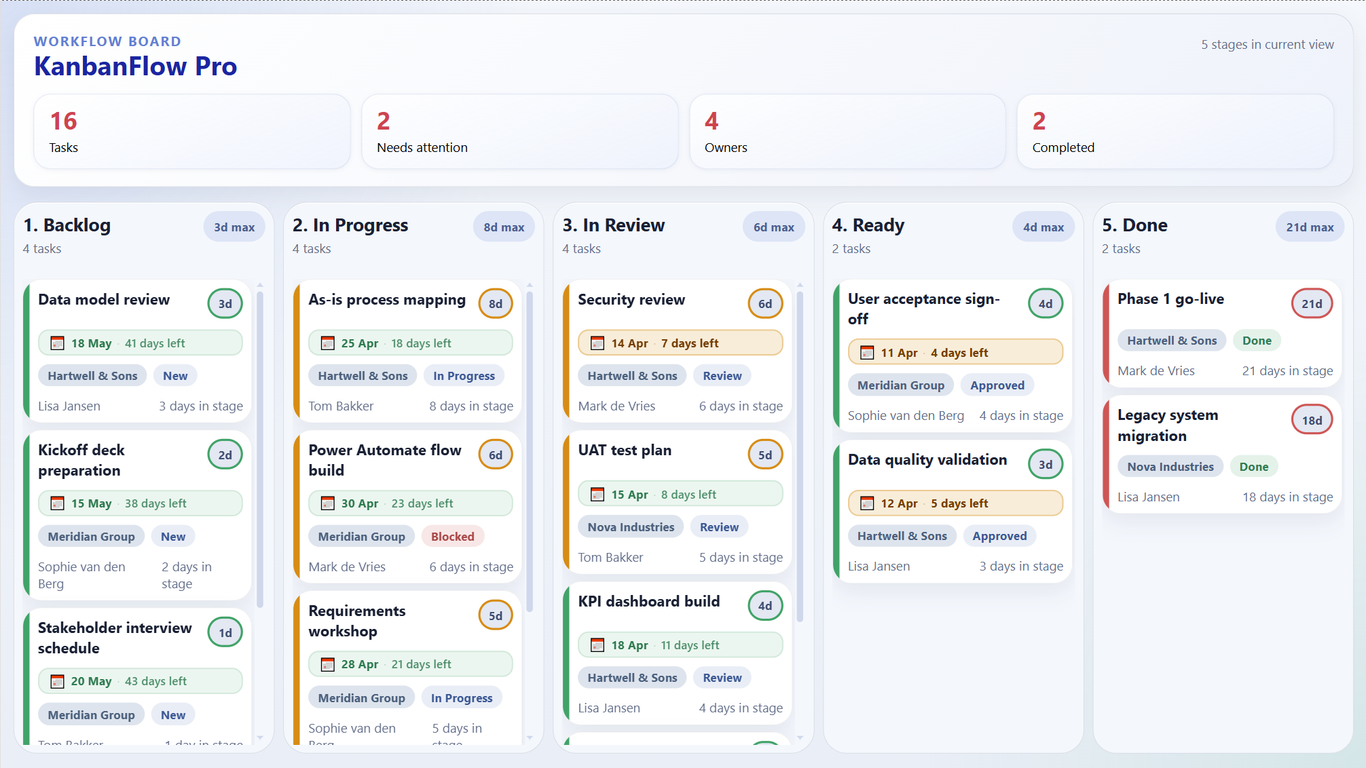
Drop KanbanFlow onto any report canvas and your SharePoint or dataflow data becomes an interactive Kanban or Scrum board — no separate tool, no export, no copy-paste.
Power BI Custom Visual
Visualise tasks, sprints, and workflows by stage — with aging indicators, drag-and-drop, stage accent colors, and write-back to SharePoint via Power Automate.
30-day free trial · No credit card · All Pro features included

Pricing
Viewers don't need a license — only the analyst who builds the report.
Trial
Try KanbanFlow free — no key, no time limit.
Basic
Live Kanban board in Power BI for individuals and small teams.
Pro
Unlimited board with aging colors and full visual formatting.
Premium
The board that writes back. One action updates Power BI and SharePoint.
Need unlimited authors? Ask about our Organisation license — €1,499/year, unlimited report authors.
What you get
Live board
Drop KanbanFlow onto any report canvas and your SharePoint or dataflow data becomes an interactive Kanban or Scrum board — no separate tool, no export, no copy-paste.
Write-back
Click any card to add or edit a note. KanbanFlow posts it straight to your SharePoint list via Power Automate — ideal for Agile teams managing backlog items and sprint tasks.
Stage write-back
Premium users can drag work items between swim lanes and hit Apply. The move is written back to SharePoint — keeping your Kanban board, Scrum board, and task list in sync.
Full formatting
Set per-stage accent colors, font sizes, aging thresholds, and layout presets — all from the Power BI Format pane. Visualise sprints, epics, or workflow columns your way.
Aging indicators
Cards and swim lanes automatically color-code by days in stage. Green, amber, red — cycle time and flow efficiency problems are visible at a glance.
Your tenant
KanbanFlow never sends your data to Ectrics servers. Write-back flows run in your own Power Automate environment. GDPR-safe by design — built for enterprise Agile teams.
The alternative
For a 50-person team, Monday.com Pro costs ~$950/month. KanbanFlow Pro for 2 report authors costs €58/month — and the Agile board lives inside the Power BI reports your team already uses daily. No context switching. No duplicate data entry. Same sprint, same tool.
How it works
01
Download KanbanFlow from AppSource or import the .pbiviz file into Power BI Desktop.
02
Map Task, Stage, Assignee, and optional fields like Days in Stage, Due Date, and Event ID.
03
Open the Format pane to set stage colors, fonts, aging thresholds, and layout presets.
04
Paste your Power Automate flow URL into the visual settings. Notes and stage moves sync automatically.
FAQ
Start your 30-day free trial — all Pro features, no credit card. Used by Agile teams, PMOs, and operations managers who already live in Power BI.